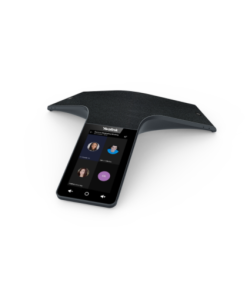
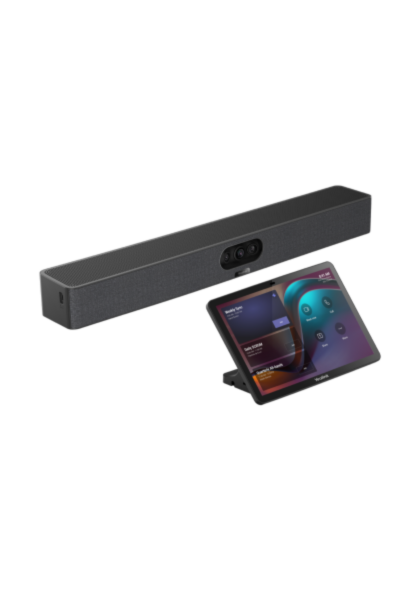
Yealink MeetingBar A25 + CTP25 คือชุดวิดีโอบาร์พร้อมทัชแพนเนลควบคุมจาก Yealink สำหรับห้องประชุมขนาดกลาง ให้ภาพและเสียงคุณภาพสูง ควบคุมการประชุมได้ง่ายผ่านหน้าจอสัมผัส เหมาะสำหรับองค์กรที่ต้องการโซลูชันประชุมครบวงจร
Yealink MeetingBar A25 + CTP25 – AI Video Conference Solution สำหรับห้องประชุมยุค Hybrid
Yealink MeetingBar A25 + CTP25 คือ AI Video Conference Solution แบบครบชุด ที่ออกแบบมาสำหรับ Focus Room และห้องประชุมขนาดเล็กยุค Hybrid Working โดยเฉพาะ
Yealink MeetingBar A25 + CTP25: มาพร้อมระบบ Triple 4K Camera, AI IntelliFocus, Speaker Tracking และ CTP25 Smart Touch Console ช่วยให้การควบคุมประชุม แชร์หน้าจอ และ BYOD ทำได้ง่ายขึ้นแบบครบจบในตัวเดียว รองรับ Microsoft Teams และ Zoom ได้ทันที
⸻
จุดเด่นของ Yealink MeetingBar A25 + CTP25
-
Triple 4K Camera System กล้อง AI 3 ตัวระดับ Ultra HD
-
มุมมองกว้างพิเศษ 151° ครอบคลุมทั้งห้องประชุม
-
Yealink MeetingBar A25 + CTP25: IntelliFocus AI แสดงภาพ Close-up ผู้พูดอัตโนมัติ
-
AI Speaker Tracking ติดตามผู้พูดอัจฉริยะ
-
Auto Framing จัดเฟรมผู้เข้าประชุมอัตโนมัติ
-
Built-in 8 MEMS Microphone Array รับเสียงได้ชัดทั่วห้อง
-
Yealink MeetingBar A25 + CTP25: Full-Duplex Audio พร้อม AI Noise Cancellation
-
CTP25 Touch Panel หน้าจอสัมผัส 10.1 นิ้ว
-
One-Cable Solution ลดสายภายในห้องประชุม
-
รองรับ BYOD + 4K Content Sharing ผ่าน USB-C
-
Yealink MeetingBar A25 + CTP25: รองรับ Microsoft Teams Room และ Zoom Room
-
รองรับ Hybrid Meeting และ Smart Office ยุคใหม่
จุดเด่น
กล้อง AI 3 ตัว ภาพคมชัดระดับ 4K
IntelliFocus และ Speaker Tracking อัจฉริยะ
ควบคุมประชุมผ่าน CTP25 ได้ง่าย
รองรับ BYOD และแชร์หน้าจอ 4K
ลดสายภายในห้องประชุมด้วย One-Cable Solution
รองรับ Teams / Zoom ได้ทันที
เหมาะกับ Hybrid Meeting และ Smart Office
⸻
เหมาะกับใคร?
-
Yealink MeetingBar A25 + CTP25: Focus Room
-
ห้องประชุมขนาดเล็ก
-
Microsoft Teams Room
-
Zoom Room
-
Yealink MeetingBar A25 + CTP25: Hybrid Working
-
Online Meeting
-
ผู้บริหารและทีมงานองค์กร
-
องค์กรที่ต้องการ AI Video Conference
-
Smart Office และ Digital Workplace
⸻
ทำไมองค์กรถึงเลือก MeetingBar A25 + CTP25?
Yealink MeetingBar A25 + CTP25 ถูกออกแบบมาเพื่อองค์กรที่ต้องการ “Video Conference แบบ AI ครบจบในตัวเดียว พร้อมระบบควบคุมห้องประชุมอัจฉริยะ”
ด้วยระบบ Triple 4K Camera และมุมมองกว้าง 151° ช่วยให้เห็นผู้เข้าประชุมครบทุกคนแม้ในพื้นที่จำกัด พร้อม AI IntelliFocus และ Speaker Tracking ที่ช่วยติดตามผู้พูดแบบอัจฉริยะ ส่วน CTP25 Touch Panel ช่วยให้ควบคุมการประชุม แชร์หน้าจอ และใช้งาน BYOD ได้สะดวกมากขึ้น เหมาะสำหรับองค์กรยุค Hybrid Working และ Smart Office
#YealinkA25 #MeetingBarA25 #CTP25 #TouchPanel #VideoBar #AllInOneVideoBar #VideoConference #ConferenceCamera #TeamsRoom #ZoomRoom #MeetingRoomSolution #HybridMeeting #MicrosoftTeams #ZoomMeeting #4KCamera #AIFraming #SpeakerTracking #IntelliFocus #BYOD #ConferenceRoom #Yealink #SmartOffice #ห้องประชุมอัจฉริยะ #กล้องประชุม #ระบบประชุมออนไลน์ #VideoConferenceSystem #ConferenceSolution #UnifiedCommunication #MeetingRoom #HybridWorking
⸻
สรุป Yealink MeetingBar A25 + CTP25 เหมาะกับห้องประชุมแบบไหน
Yealink MeetingBar A25 + CTP25 เหมาะสำหรับห้องประชุมขนาดกลางที่ต้องการระบบควบคุมการประชุมผ่านทัชแพนเนล. However, room network infrastructure should be verified to support the touch panel’s wireless connection to the video bar. Therefore, IT teams should confirm Wi-Fi or Bluetooth pairing reliability during installation. Additionally, this system integrates well with major cloud video conferencing platforms for one-touch meeting joins. For example, users can start scheduled meetings directly from the touch panel without a separate laptop. As a result, meetings start faster and with less technical friction. Similarly, centralized device management tools help IT teams monitor multiple meeting rooms from a single dashboard.
สนใจ Yealink MeetingBar A25 + CTP25 หรือโซลูชันห้องประชุม Yealink รุ่นอื่นๆ ดูเพิ่มเติมได้ที่ UC Gangster หรือศึกษาข้อมูลเทคโนโลยี Unified Communications ที่ Gartner UC Glossary
Organizations deploying multiple meeting room systems across different offices often benefit from centralized device management platforms that allow IT staff to monitor status, push firmware updates, and troubleshoot issues remotely. Standardizing on a consistent hardware ecosystem across locations reduces training overhead for facilities staff and simplifies spare parts inventory. When planning a rollout, it helps to pilot the system in one room first to gather user feedback before scaling to additional locations.
อ่านเพิ่มเติม: Video Conference ราคา เท่าไหร่? เทียบต้นทุนก่อนติดตั้ง
ดูสินค้า Yealink ทุกรุ่นเพิ่มเติมได้ที่ หน้าแบรนด์ Yealink