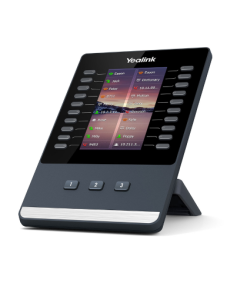


🔥 Yealink RoomPanel E2 – Smart Meeting Room Panel สำหรับจองห้องประชุมยุคใหม่
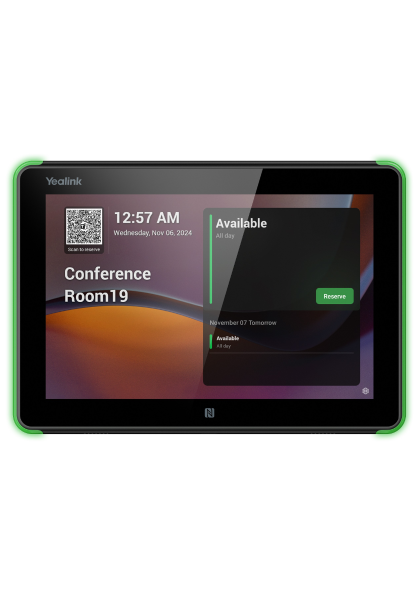
Yealink RoomPanel E2 คือ Smart Meeting Room Panel รุ่นใหม่จาก Yealink สำหรับจองห้องประชุมยุคใหม่
Yealink RoomPanel E2 คือ Smart Meeting Room Panel รุ่นใหม่ ที่ออกแบบมาสำหรับองค์กรยุค Hybrid Working ช่วยให้การจองห้องประชุมและบริหารพื้นที่ทำงานทำได้ง่ายขึ้น ดูทันสมัย และเป็นมืออาชีพมากขึ้น
👉 รองรับ Microsoft Teams Panel และ Zoom Room Scheduling พร้อมหน้าจอสัมผัสขนาดใหญ่ แสดงสถานะห้องประชุมแบบ Real-Time ช่วยลดปัญหาห้องซ้อน ห้องว่างแต่ไม่ถูกใช้งาน และเพิ่มประสิทธิภาพการบริหารห้องประชุมภายในองค์กร
🚀 จุดเด่นของ Yealink RoomPanel E2
- 🖥 Smart Room Scheduling Panel สำหรับจองห้องประชุม
- 📅 แสดงสถานะห้องประชุมแบบ Real-Time
- ☁ รองรับ Microsoft Teams และ Zoom Room
- 👆 หน้าจอสัมผัสใช้งานง่าย ทันสมัย
- 🚦 LED Status Light แสดงสถานะห้องว่าง / ไม่ว่าง
- ⚡ ติดตั้งง่าย รองรับ PoE
- 🪶 ดีไซน์บาง สวยงาม เหมาะกับ Smart Office
- 🏢 เหมาะสำหรับองค์กรและห้องประชุมทุกขนาด
- 🚀 ช่วยลดปัญหาการจองห้องซ้ำ
- 🔒 เพิ่มความ Professional ให้สำนักงานยุคใหม่
⸻
🎯 จุดเด่น
✔ จองห้องประชุมง่ายขึ้น
✔ แสดงสถานะห้องแบบ Real-Time
✔ รองรับ Teams / Zoom ได้ทันที
✔ ลดปัญหาห้องประชุมซ้อน
✔ ดีไซน์สวย ทันสมัย ระดับองค์กร
✔ ติดตั้งง่าย รองรับ PoE
✔ เหมาะกับ Smart Office และ Hybrid Working
⸻
🎯 เหมาะกับใคร?
- องค์กรที่มีหลายห้องประชุม
- Microsoft Teams Room
- Zoom Room
- Smart Office
- Hybrid Working
- อาคารสำนักงาน
- ผู้บริหารและทีมงานองค์กร
- องค์กรที่ต้องการ Room Scheduling System
- Digital Workplace
⸻
🎯 ทำไมองค์กรถึงเลือก RoomPanel E2?
Yealink RoomPanel E2 ถูกออกแบบมาเพื่อองค์กรที่ต้องการ “ระบบจองห้องประชุมที่ทันสมัยและใช้งานง่าย”
ด้วยหน้าจอสัมผัสและระบบ Room Scheduling แบบ Real-Time ช่วยให้พนักงานสามารถตรวจสอบและจองห้องประชุมได้สะดวกมากขึ้น พร้อมไฟ LED แสดงสถานะห้อง ช่วยลดปัญหาการใช้งานห้องประชุมซ้ำซ้อน และยกระดับภาพลักษณ์ Smart Office ขององค์กร
⸻
#YealinkRoomPanelE2 #RoomPanel #RoomScheduling #MeetingRoomPanel #TeamsRoom #ZoomRoom #SmartOffice #MeetingRoomSolution #HybridWorking #MicrosoftTeams #ZoomMeeting #RoomBookingSystem #ConferenceRoom #DigitalWorkplace #MeetingRoom #Yealink #ห้องประชุมอัจฉริยะ #จองห้องประชุม #ระบบจองห้องประชุม #SmartMeeting #ConferenceSolution #UnifiedCommunication #OfficeTechnology #WorkspaceManagement
⸻
Why Choose Yealink RoomPanel E2
Yealink RoomPanel E2 gives facility teams a clear, real-time view of meeting room availability, reducing double bookings and manual scheduling conflicts across the office.
With native Microsoft Teams and Zoom Room integration, Yealink RoomPanel E2 fits directly into existing meeting workflows without requiring a separate booking system.
ดูสินค้าที่เกี่ยวข้องในหมวด Meeting Rooms หรืออ่านข้อมูลเพิ่มเติมเกี่ยวกับ Room Booking Systems
Deployment and Compatibility
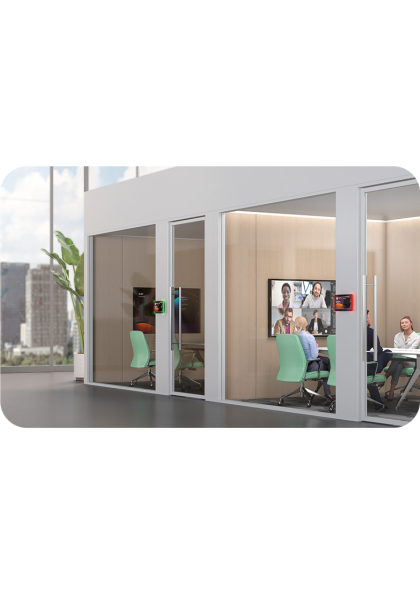
Meeting room panels mounted outside each room give visiting employees and guests a quick way to check availability without opening a calendar app. Installation typically takes under thirty minutes per room, using either PoE or standard power.
These panels work well in mixed environments where some rooms use Microsoft Teams and others use Zoom, since both scheduling platforms are supported natively without extra configuration.
Security and Firmware Updates
Regular firmware releases keep the panel compatible with evolving calendar platforms and security requirements. IT administrators can manage the device remotely, reducing the need for on-site visits after the initial installation.
Choosing the right room scheduling hardware involves comparing display size, mounting options, and how well the device integrates with existing calendar systems. Facility teams should also consider battery backup options for buildings with unreliable power.
Over time, well-labeled meeting rooms with visible availability status reduce interruptions and help employees find open spaces faster, improving overall workplace efficiency.
อ่านเพิ่มเติม: ห้องประชุมอัจฉริยะ ราคา เท่าไหร่? เทียบต้นทุนติดตั้ง
ดูสินค้า Yealink ทุกรุ่นเพิ่มเติมได้ที่ หน้าแบรนด์ Yealink